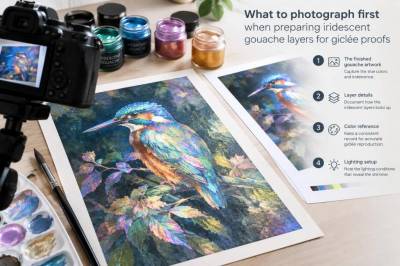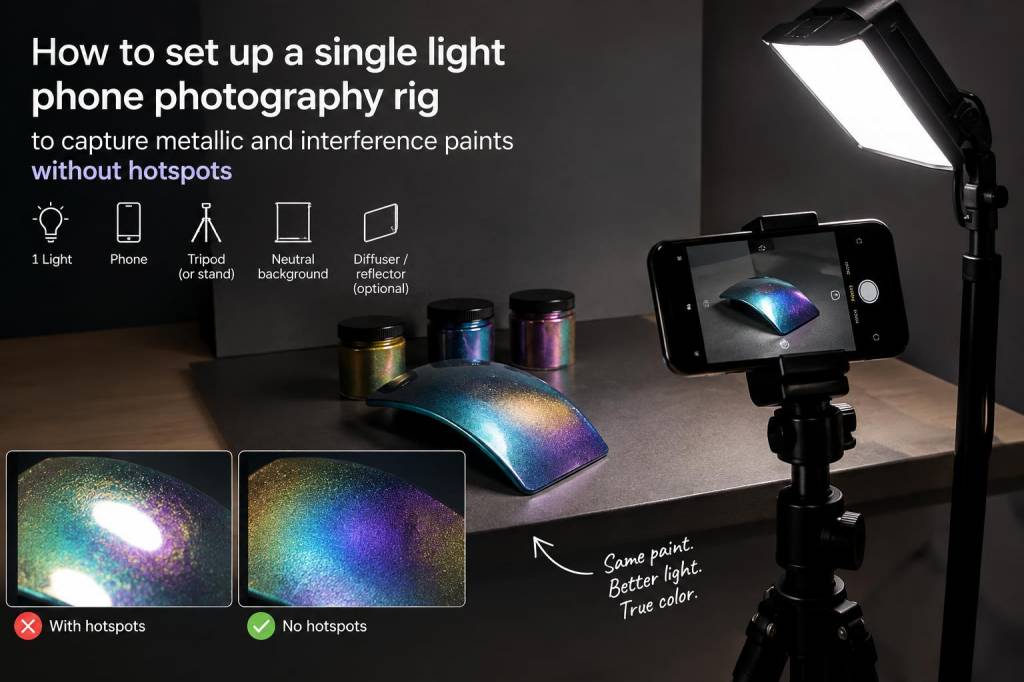
I often photograph my own paintings and mixed-media pieces for Sonriseartists — portfolio shots, Instagram posts, and process documentation. When I started working with metallic and interference paints, I quickly learned that what looks stunning in the studio can turn into an unhelpful glare or bright hotspot in a photograph. Over time I developed a simple, single-light phone rig and a repeatable approach that captures shimmer, color-shifts and texture without blowing out highlights. Here’s how I build it and why each choice matters.
Why a single-light setup?
A single, well-controlled light makes it far easier to manage reflections from metallic flakes and interference pigments. Multiple light sources can introduce competing specular highlights and confused colors. With one directional light I can choose the angle that reveals iridescence, sculpt texture with low-angle grazing light, or flatten for colour accuracy — all without chasing multiple hotspots.
What I use (basic kit)
- Phone — I use an iPhone 13 Pro for its RAW capture and manual controls; the approach works equally well with most recent Android phones.
- Tripod — A compact tripod or Joby GorillaPod to hold the phone steady and allow small adjustments in height and angle.
- Single LED light — A small bi-colour LED panel such as the Aputure Amaran AL-MX or the Neewer 176 LED. These are bright, portable and dimmable.
- Diffuser — A softbox, a 60cm shoot-through umbrella, or a simple diffusion panel made from tracing paper or a white shower curtain. I keep a Westcott scrim for larger pieces.
- Polariser — A clip-on circular polariser for phones (Moment’s variable ND/PL or inexpensive clip filters). This is crucial for taming unwanted reflections while retaining metallic sheen when used subtly.
- Black foamboard / flags — To control spill light and deepen shadows.
- Remote shutter / timer — To avoid camera shake when shooting RAW or long exposures.
Set-up: step-by-step
I set up on a table with good working room. My painting sits vertically against a neutral wall or on an easel; photographing flat work upright reduces distortion and allows comfortable positioning of the light.
- Position the phone on the tripod so the camera lens is centered with the artwork.
- Place the LED light at a distance of roughly 60–120 cm from the painting, off to one side. The exact distance depends on panel size and brightness — further gives softer fall-off.
- Attach the diffuser between the light and the painting. For a single-light rig you want the diffuser close to the painting relative to the light: placing it closer to the painting increases softness and reduces hotspots.
- Use black foamboard on the opposite side to cut reflections and increase contrast if needed.
- Clip or attach a polariser to the phone lens if possible. On phones with multiple lenses, be mindful to fit the polariser to the lens you’re actually using for the shot (wide vs main).
Angle matters: finding the sweet spot
I move the light and my phone rather than the artwork. For metallic or interference paints, the perceived colour shift often depends on the angle between light, pigment, and camera. I follow this routine:
- Start at a 45° light angle relative to the painting’s surface and the camera axis.
- Slowly rotate the light (or move the phone) while watching the screen. The shimmering effect will intensify at certain angles and sometimes disappear at others.
- When I want to avoid a bright hotspot, I back off the light or increase diffusion rather than changing angle dramatically — that preserves the iridescence while reducing blown highlights.
Using a polariser effectively
Polarising filters are powerful but easy to overuse. On interference paints, a polariser can either reduce unwanted mirror-like reflections or suppress the very sheen you want. I use it like this:
- Attach the polariser and rotate it slowly while observing the specular highlights. Stop when highlights are reduced but the metallic texture and colour-shift remain.
- If colours dull too much, back off the polariser; remember it's reducing all reflected, polarised light and can flatten iridescence if turned too far.
- For extreme cases I take two frames — one with the polariser rotated to limit glare, another without — and combine details in post if needed.
Camera settings and capture
Phones give you manual controls via apps like ProCamera, Lightroom Mobile, or the native iPhone ProRAW. I shoot RAW when possible to retain highlight and colour information.
| Setting | Typical value |
| ISO | Lowest native ISO (usually 25–100) |
| Shutter speed | 1/30s to 1/200s depending on stability — use a tripod and remote for slower speeds |
| Aperture | Fixed on most phones — use lens selection and distance to control depth of field |
| White balance | Manual kelvin matching your light (3200–5600K), or set with a grey card |
| Format | RAW/ProRAW if available |
I bracket exposures for particularly reflective surfaces: one neutral exposure and one slightly underexposed to protect highlights. This gives me headroom in editing to recover texture without blown patches.
Diffusion and softening hotspots
Diffusion is your friend. If you still see hotspots after using a polariser and moving the light, increase the diffusion size or distance. Practical options I use:
- A larger softbox to spread the light across the whole painting so the reflection becomes broad and even.
- A folding diffusion panel placed close to the painting which catches the concentrated reflection and disperses it.
- Layering diffusion (two layers of tracing paper) if a single layer gives too much specular intensity.
Post-production tips
Once I import RAW files into Lightroom or Snapseed, I:
- Start by recovering highlights and refining exposure. Underexposed frames often retain more colour for metallics.
- Adjust clarity/modulation carefully — too much makes metallic pigments look grainy; a gentle increase helps texture.
- Tweak HSL selectively to bring out interference shifts (for example, lift magenta/orange saturation if the paint shifts that way).
- For final polish I sometimes composite a polarised and unpolarised image to balance gloss and colour.
Troubleshooting common problems
- Persistent hotspots: Move the light further away, increase diffusion, or add a flag to block the specular path.
- Colours look flat: Reduce polariser strength or raise fill contrast with a reflector on the shadow side.
- Detail lost in shadows: Open shadows slightly in RAW processing — but avoid raising blacks too much or metallic areas will look matte.
- Phone auto-adjust interferes: Lock exposure and focus after composing to prevent the phone from re-evaluating when you move slightly.
With a little practice, this simple single-light phone rig gives me consistent, usable images that honour the sparkle and subtle shifts of metallic and interference paints without the distraction of hotspots. It’s portable, inexpensive, and adaptable — and works whether I’m documenting a small study or photographing a larger canvas in my studio.